
Ryanair
Ryanair LimitedTravel & Local
3.21.17K Reviews
- Version
- 3.238.0
- Installs
- 50.00M
- Age Rating
- Everyone
Screenshots

Our Review of Ryanair
 Analysis by Appyee
When I first opened Ryanair, I treated it less like a travel companion and more like a practical tool for getting from a search screen to a boarding pass. That is still the right way to understand it. This is a free Travel & Local app from Ryanair Limited, built for people who already use the airline or are considering one of its flights. Its appeal is immediate: instead of moving between a general flight-search service, an airline website, an email inbox, and a separate travel folder, I can keep the main parts of a Ryanair journey closer together.
The first impression is helped by the app’s clear purpose. It is not trying to become a full city guide, a social travel diary, or a universal booking service. It focuses on Ryanair journeys, which makes it especially useful when I already know the airline I want to fly with. The trade-off appears just as quickly: the more committed I am to Ryanair, the more useful the app becomes; the more I want to compare airlines neutrally, the less central it is.
Ryanair has been available since October 25, 2012, and its longevity matters. This is not a new travel experiment that I would install only for one trip and forget. The current version is 3.238.0, and the app has passed fifty million installs, so it occupies a familiar place in many travelers’ routines. Its average rating is 3.2 from roughly 386 thousand ratings, with about 1.2 thousand written reviews. Those figures suggest a very recognizable pattern: plenty of people find it useful enough to keep, while the experience can still produce frustration when travel details become complicated.
What feels useful during the first week
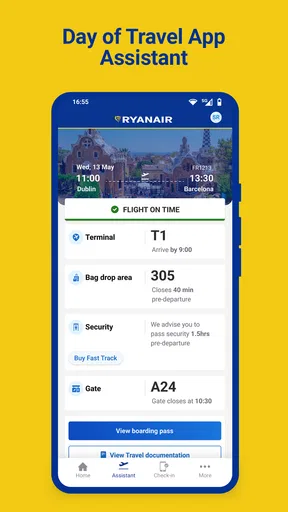
During the first week, the strongest benefit is concentration. I can use the airline’s own app as the starting point for checking a journey rather than relying entirely on a browser tab or a confirmation message. That is particularly convenient when I am preparing for a short European trip and need to revisit the same booking more than once. The app’s store summary presents Europe as something reachable with a tap, but in daily use I value the less glamorous part more: having a dedicated place for the airline-related steps I actually need to remember.
A realistic example is a weekend trip booked several weeks ahead. At first, I may open the app to look at the booking and then ignore it for days. As departure approaches, I return to check the itinerary, review what I need to do next, and keep the travel information in the same place. That repeated access is where the app starts to justify itself. I do not need to remember which browser tab contains the reservation, and I am less likely to search through old messages while standing in a crowded station or airport queue.
The app is also a sensible choice for someone who prefers handling a flight directly with the airline rather than through a general travel marketplace. A comparison service is often better for discovering routes across several carriers, but once I have selected a Ryanair flight, the airline’s own app is the more natural home for that booking. It reduces the mental gap between buying a ticket and managing the resulting trip.
That does not mean I would begin every journey here. If I am flexible about airports, dates, airlines, or connecting routes, I would still start with a broad flight-search tool. Ryanair’s app is strongest after the search has narrowed to this carrier. Using it as a universal travel planner would make the experience feel narrower than it needs to be, because its value comes from direct airline context rather than from surveying the entire market.
One useful habit is to install it before I need it, not while rushing through a terminal. I can sign in, locate the relevant booking, and make sure I understand where the important travel information appears while I still have time. That small preparation step matters because airline apps are most stressful when opened for the first time beside a departure board, with poor attention and a weak connection.
The age rating is Everyone, which fits the app’s everyday travel purpose. It is not an entertainment product aimed at a particular age group, and I can see why a family might use it as part of organizing a shared trip. Still, the app does not replace the judgment of the person booking or supervising travel. A younger traveler may be able to view information, but an adult should remain responsible for checking names, dates, airports, and the practical requirements of the journey.
Where the airline focus helps
The biggest first-week advantage is consistency. When I book with Ryanair, I do not have to translate information from a third-party service into the airline’s own process. I can return to the same branded environment for the journey, which feels more direct than using a generic travel app for every step. This is especially valuable for occasional travelers who do not want to learn several different airline interfaces at once.
There is also a useful psychological benefit. A general booking service may show many options, but after I choose a flight I still need to deal with the carrier. The dedicated app makes that relationship visible from the beginning. I know which company’s rules and workflow I am dealing with, rather than assuming that the comparison service will handle every later detail.
My caution is that this same focus can make the app feel less helpful when my plans change. If I am deciding whether another airline offers a better time or a simpler airport, I need a separate comparison process. This app is a good companion to that research, not a replacement for it.
Why it can remain useful from month to month
The long-term value is not based on novelty. Travel apps rarely become daily habits for me unless I fly regularly, but that is not a weakness here. Ryanair earns space on my phone when I have an upcoming booking, a possible trip, or a habit of using the airline often. Its recurring value comes from being available at the moments when travel details become important, rather than from demanding constant attention.
For a frequent Ryanair passenger, that can be enough to make the app worthwhile. Each new journey gives me a reason to return, and the familiar interface can reduce the effort of starting over. I do not have to decide which service should hold my airline information every time. The app becomes a small part of a repeatable routine: search broadly if necessary, book, open the airline app, check the trip, and return when the departure gets closer.
For an occasional traveler, the calculation is different. If I take one flight every few years, I may not want another app occupying storage or notifications competing for attention. In that situation, the mobile website or the information in my booking messages may be sufficient for some tasks. I would still consider installing the app for an active trip, but I would not assume it deserves permanent space afterward.
This is where the app’s free price helps. I can try it without paying for access, decide whether it improves my travel routine, and remove it later if I rarely fly. The absence of a purchase barrier makes experimentation easy, although free does not automatically mean frictionless. My time, attention, and willingness to manage airline-specific steps are still part of the real cost.
A practical monthly routine is to open the app only at meaningful checkpoints. I might check the booking after making a change, revisit it before preparing luggage, and use it again when I am ready for the airport. I do not need to browse it casually. That limited, purposeful use is actually a strength: the app can remain useful without becoming another service that expects me to scroll every day.
Another non-obvious advantage is that a dedicated airline app can act as a memory aid. Travel plans often involve small details that are easy to confuse when several trips are being arranged. Keeping the Ryanair journey separate from hotel reservations, restaurant bookings, and sightseeing notes helps me identify which information belongs to the flight itself. I still keep a backup record of essential details, but the app gives the airline portion a clear home.
When alternatives are better month after month
I would choose a general flight-search app when price and schedule comparison are my main priorities. Those services are designed to help me weigh multiple airlines and routes, while Ryanair’s app naturally centers on Ryanair. I would also prefer a broader travel organizer if my main problem is combining flights from different carriers with hotels, trains, and activities in one itinerary.
On the other hand, if most of my trips use Ryanair, a general organizer can become a layer of duplication. I may still need the airline’s own app for carrier-specific actions, so storing the same information in two places can create uncertainty about which version is current. My preferred arrangement is simple: use a comparison tool for discovery, then use the Ryanair app for the Ryanair part of the trip.
That division of labor is more reliable than asking one app to do everything. It also makes the decision easier for new users. If I am still choosing an airline, I start elsewhere. If I have already chosen Ryanair, this is the app I would test first.
The maintenance burden behind the convenience
Every airline app has a maintenance burden, even when the app itself is free. I need to keep it updated, remember the account or booking details I use with it, and make sure my phone can display the information when I need it. The current version, 3.238.0, shows that the product is actively maintained as a continuing service rather than a frozen utility. That is reassuring, but updates can also mean that familiar screens or steps change just when I am trying to move quickly.
My advice is not to wait until the airport to discover whether the app needs attention. Before leaving home, I open the relevant trip, check that the information is accessible, and make sure my phone has enough battery for the journey. I also keep important travel details available in another form. That is not an accusation against this particular app; it is a sensible rule for any digital boarding or booking workflow. A phone can lose power, a connection can fail, and a traveler should not depend on a single screen for every critical detail.
Notifications deserve deliberate handling as well. Travel alerts can be valuable when plans change, but too many messages can make important information harder to notice. I prefer to allow useful travel communication while avoiding the habit of opening the app repeatedly just to see whether anything has changed. The best maintenance routine is quiet and occasional: update when needed, check the trip at sensible points, and avoid turning the app into a constant source of anxiety.
Account management is another area where preparation pays off. If I am traveling with someone else, I want to know in advance which person is responsible for opening the booking and handling the next step. Passing a phone around at the airport is possible, but it is not a good plan. A smoother workflow is to agree beforehand who will manage the reservation and to keep both travelers aware of the basic itinerary.
The app also works best when I separate airline administration from trip planning. I use it for the Ryanair booking and keep accommodation addresses, transport connections, and emergency notes somewhere equally easy to reach. This prevents a common mistake: assuming that because the flight is in one app, the complete trip is also organized there.
Small habits that reduce airport friction
I would open the app before travel in a calm setting, inspect the booking, and take note of the airport and departure details rather than relying on memory. If the trip involves another person, I would confirm that names and dates are understood before leaving. At the airport, I would avoid making a major change for the first time while standing in line. The app can support the process, but it cannot remove the consequences of entering the wrong information or overlooking an airline requirement.
I also recommend keeping the app’s role clear when traveling internationally. It can be the airline-facing tool, but it is not my only source of preparation. I would separately organize accommodation, local transport, identification, and any destination-specific requirements. That approach makes the app more dependable because I am not forcing it to answer questions outside its purpose.
For people who use more than one airline, I would avoid expecting one carrier’s app to become the master record for every flight. A simple folder of airline apps or a separate itinerary note is easier to understand than trying to make one service represent a mixed trip. Ryanair works well inside a Ryanair journey; it is less elegant as the central command center for a complicated multi-carrier itinerary.
Where long-term fatigue appears
The main source of fatigue is the airline-specific nature of the experience. I may appreciate the focus on my Ryanair trip on one day and find it restrictive on another, especially when I am comparing alternatives or coordinating a larger itinerary. The app’s usefulness rises and falls with my relationship to the airline. That is a reasonable design trade-off, but it means I should not judge it by the standards of a full travel-management platform.
Another possible frustration is that airline travel itself is stressful. Even a well-maintained app cannot make every decision feel simple. I may open it expecting a quick confirmation and instead realize that I need to review several parts of the journey. The app becomes associated with deadlines, luggage decisions, airport timing, and changes of plan. Some of the fatigue belongs to travel rather than the software, but the interface is where that pressure is experienced.
I also find that convenience can encourage overconfidence. Because the booking is visible on my phone, I might assume I have completed everything important. I still need to read the information carefully and prepare for the physical journey. A digital record is not the same as a complete travel plan, and the app should support my preparation rather than replace it.
The rating of 3.2 reflects why I would keep expectations realistic. The app is popular and widely installed, but popularity does not guarantee that every traveler will find every step pleasant. My experience of a travel app depends on the booking, the timing, the phone, the network, and how clearly I understand what needs to happen next. I would recommend it as a useful airline tool, not as a promise of a completely effortless trip.
People who dislike airline-specific apps may reasonably skip it. If I fly with many carriers, rarely use Ryanair, or already have a trusted mobile-browser routine, another option may create less clutter. I would also skip making it my only travel backup. The app earns trust through preparation and sensible use, not through blind dependence.
Does it earn permanent space?
My long-term verdict is positive but conditional. Ryanair earns permanent space on my phone when I fly with Ryanair often enough to benefit from a repeatable booking-and-travel routine. It is free, focused, established, and available on devices running iOS 9 or later. The Everyone rating makes it broadly approachable, while the large install base shows that it has become a familiar tool for many passengers.
I would not keep it installed purely because it is an airline app. Its lasting value comes from active relevance. If I have an upcoming Ryanair journey, I want it ready before the trip. If months pass without another booking, removing it and reinstalling it later is a reasonable choice, provided I preserve the information I need. That is a healthier relationship than treating every travel app as a permanent necessity.
The app is best for a traveler who wants direct access to a Ryanair booking and prefers one carrier-specific place for managing the flight. It is less suitable for someone whose main need is broad comparison, mixed-airline itinerary planning, or a complete destination guide. In those cases, I would combine it with a general travel service rather than asking it to cover the entire trip.
My practical recommendation is to use it as the airline layer of your travel setup, not as your whole travel setup. Install it before the journey, check the booking while you still have time, keep a backup of essential details, and return to it at meaningful checkpoints instead of constantly monitoring it. Used that way, the app avoids most of the fatigue that can make airline software feel like extra work.
After the first-week appeal fades, the question is whether the app saves effort on the next trip. For regular Ryanair passengers, I think it does. For everyone else, its value is more temporary, but the free price makes that temporary usefulness easy to test. I would recommend it to friends flying with Ryanair, while being clear that a broader comparison or itinerary app may be the better starting point for travelers still deciding where and how to fly.
Verdict
Strengths of Ryanair
- Very low fares on many European routes
- Large network of regional airports
- Fast, simple mobile check-in process
- Useful fare alerts and travel notifications
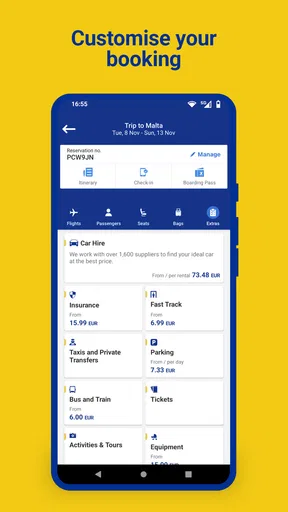
- Optional extras let travelers customize their booking
Limitations of Ryanair
- Strict cabin-bag size limits can lead to extra charges
- Seat selection and priority boarding cost more
- Basic fares usually exclude checked luggage
- Flights may use airports far from city centers
- Customer support can be difficult during disruptions
Similar Picks in This Category
View All
Google Maps
Google LLC3.4

Google Maps Go
Google LLC4.1

Booking.com: Hotels & Travel
Booking.com Hotels & Vacation Rentals4.8

Google Earth
Google LLC3.8

Skyscanner Flights Hotels Cars
Skyscanner Ltd4.8

trivago: Compare hotel prices
trivago N.V.4.4
Frequently Asked Questions
What is the Ryanair app used for?
The Ryanair app is designed to manage most parts of a flight booking in one place. You can search for routes, compare fares, book flights, add baggage or seats, complete check-in, access boarding passes, and review travel details. It also provides notifications and booking updates, although some changes may still require contacting Ryanair customer support.
Can I check in and use my boarding pass through the Ryanair app?
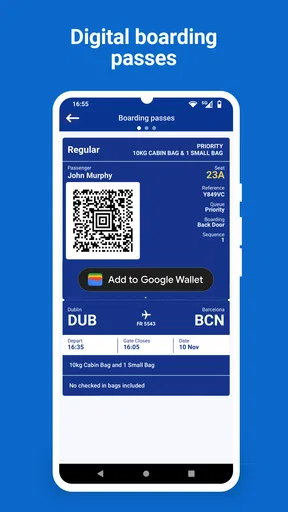
Yes, the Ryanair app allows eligible passengers to check in and display their boarding passes on a smartphone. After completing check-in, the pass can usually be accessed from the trip section, even when traveling with more than one passenger. It is still sensible to keep your phone charged and carry identification, since airport staff may request both.
Does the Ryanair app include baggage and seat selection options?
Yes, baggage allowances and seat selection can generally be added during booking or managed afterward through the app. Available choices and prices depend on the route, fare type, and timing. The application clearly shows optional extras, but travelers should review the final price carefully because luggage, priority boarding, reserved seats, and other services can substantially increase the original fare.
Can I change or cancel a Ryanair booking in the app?
The app provides access to booking management tools, including options to review certain changes, add services, or modify travel details where Ryanair’s rules permit it. However, cancellation and refund conditions can be restrictive, particularly for low-cost fares. Before confirming a change, check the displayed fees, deadlines, and fare conditions because some payments may be non-refundable.
Is the Ryanair app free to download, and does it work on Android and iPhone?
The Ryanair app is generally free to download from the official Google Play Store for Android devices and the Apple App Store for iPhone. Downloading the app does not mean that flights or optional services are free; normal booking charges and fare prices still apply. For security, install only the official application and verify the developer before entering payment information.
